
Project Design View
See the Feature repeat around the selected vessel ring.
You will return to the support console and the user session banner will disappear.
Less time planning, more time turning
Wedge-Planner is the all-in-one design tool for segmented woodturning. Draw your profile, plan every ring, build custom feature patterns, and preview the finished vessel in 3D — all in your browser.
Full project-design trial for 14 days once you start designing. No credit card.
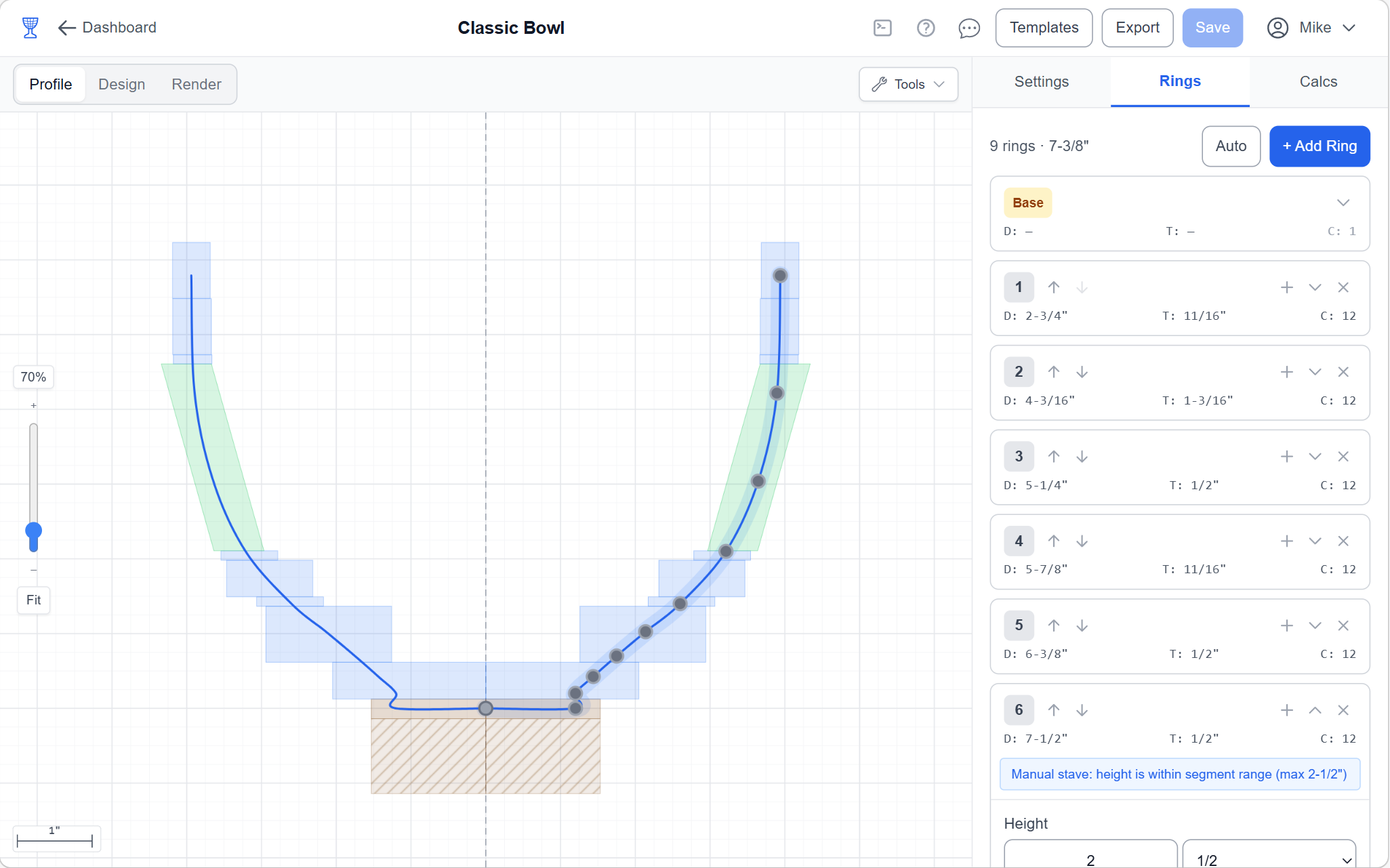
Miter angles, segment lengths, segment widths, circumferences — Wedge-Planner calculates every dimension automatically from your profile curve. No formulas needed.
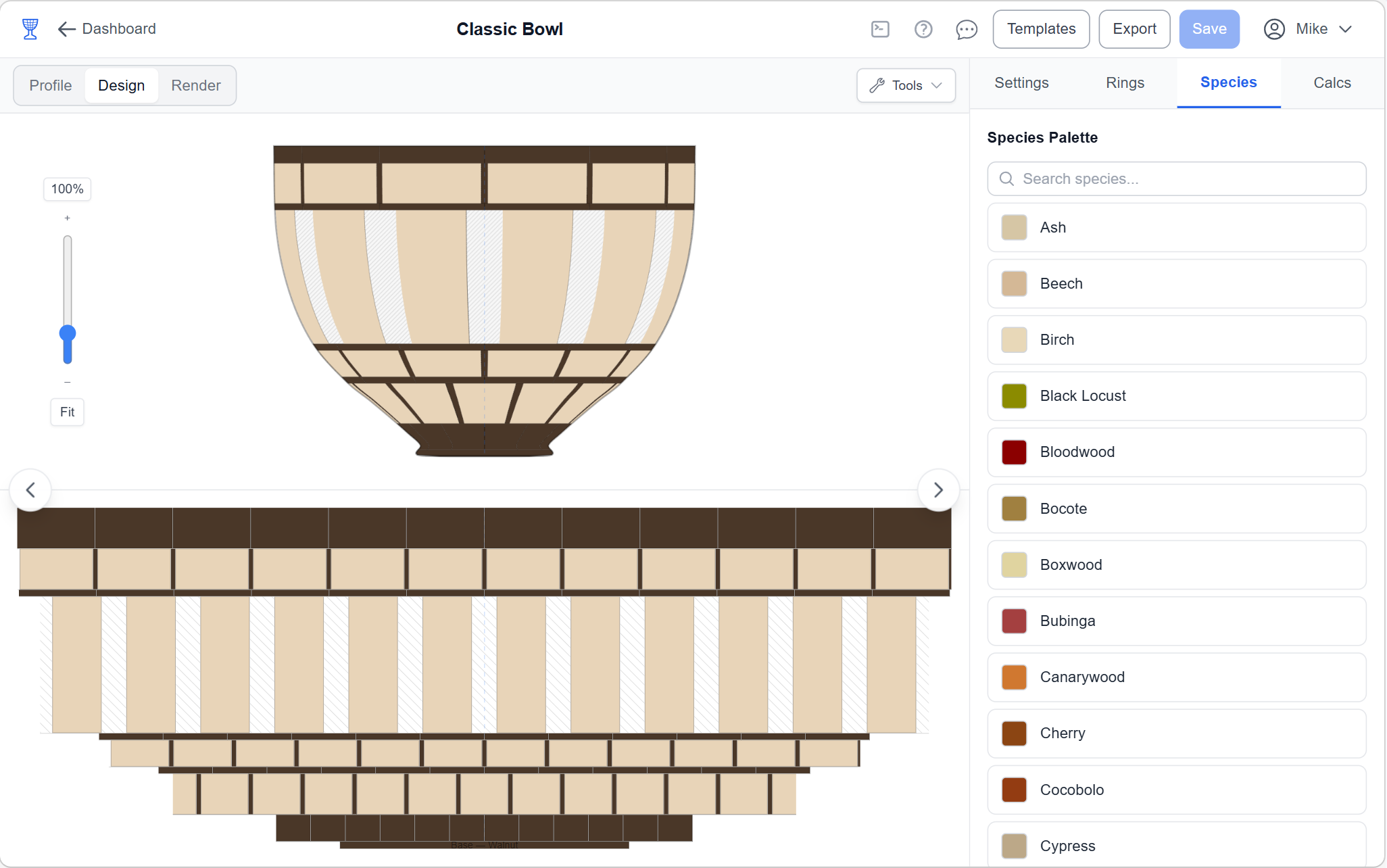
See your vessel from three angles: 2D profile, top-down design view with wood colors, and a fully interactive 3D render — before you cut a single piece of wood.
Wedge-Planner runs entirely in your browser. Use it on your iPad in the shop, your laptop in the garage, or your desktop at home. Always synced, always ready.
Switch between Profile, Design, and Render with a single click.
Start with a template or draw freehand. Shape your vessel with smooth spline curves and draggable nodes. The profile editor is your creative canvas — the math follows your design, not the other way around.
The design view shows your vessel assembled with real wood colors. See every segment in the top-down ring layout and the 2D cross-section. Choose from 50+ species with realistic color swatches.
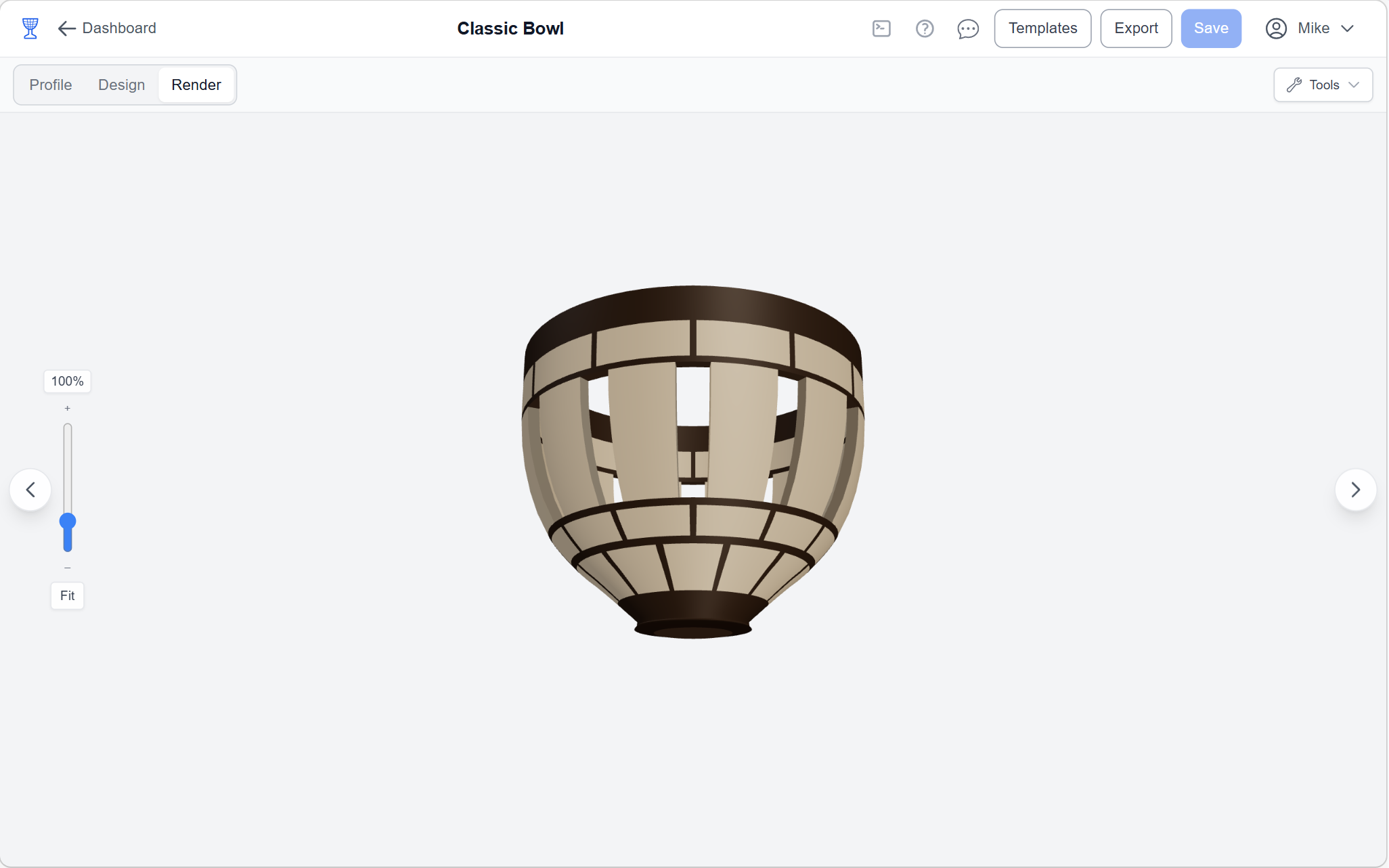
See your vessel in a fully interactive 3D render. Rotate, zoom, and inspect every ring and segment from any angle. This is what your finished piece will look like — before you turn on the lathe.
Feature Studio
Turn a pattern idea into a constructible wood assembly. Plan the strips, place kerf-aware cuts, arrange the pieces, size the result to its target, and carry a visual guide into the shop.
Repeat a feature around the ring.
Place a focal design where it belongs.
Designed together
Classic Bowl + Continuous Zigzag

See the Feature repeat around the selected vessel ring.

Construct and size a repeatable pattern in Feature Studio.

Build a focal motif for placement on selected segments.
Construction history, captured for you
Feature Studio remembers what every piece came from. Cuts create a new generation; reorders and glue-ups preserve that ancestry; then the process can repeat. Because the history is captured while you design, Wedge-Planner builds the visual guide automatically.
Record the cut, kerf, resulting pieces, and offcuts.
Track how pieces move, flip, align, and join.
Keep every new generation linked to the one before it.
From stock to finished Feature
Each saved construction step preserves the visual information you need without turning the guide into another spreadsheet.

Build the contrasting strip stack.

Place the repeat with saw kerf included.

See every resulting piece before it moves.

Reorient the pieces into the pattern.

Trim the Feature to its target size.
Every tool a segmented woodturner needs — from first sketch to finished build.
Create as many designs as you want with Pro. Bowls, vases, goblets, platters, lidded boxes — no project limits holding you back.
One click fills your entire profile with evenly spaced rings. Adjust heights, add rings, remove rings — the calculations update instantly.
The classic approach. Set segment count per ring, choose wood species, and get precise miter angles, segment lengths, and stock dimensions for every piece.
Switch to stave mode for vertical-strip construction. Set stave count, species, and dimensions — perfect for vases, lamp shades, and tall vessels.
Design rings with intentional gaps between segments for dramatic see-through patterns. The planner keeps the chosen physical construction consistent across calculations, guides, exports, and the 3D preview.
Add thin accent strips between rings for visual pop. Mix dark and light species to create striking patterns that make your work stand out.
Choose from a curated library of domestic and exotic species with realistic color swatches. Walnut, maple, cherry, padauk, purpleheart, bloodwood, and many more.
Instant segment dimensions, miter angles, segment lengths, and circumferences — formatted in fractions down to 1/16". Zero guesswork, zero rounding errors.
Complete material lists with quantities and dimensions per ring. Board feet totals by species. Take it straight to the shop — everything you need on one page.
Export project overviews, build guides, design maps, checking templates, and slicer-neutral 3D models. Human-readable and ready for the shop.
Design closed-profile vessels with a draggable parting line. The ring list shows exactly where the lid separates from the body. Turn the whole piece, then part it.
Comprehensive tutorials, woodturning terminology, and step-by-step guides right inside the app. Whether you're a beginner or a pro, the knowledge base has you covered.
Four steps. No spreadsheets. No guesswork.
Pick a template or start from scratch. Shape the curve by dragging nodes. Your design, your way.
Auto-fill rings with one click. Pick wood species for each ring from the 50+ species palette.
Check calculations, switch to Design or Render view, and verify everything looks right before you cut.
Download the build guide or full workshop PDF pack, print the design map, and head to the shop with exact measurements.
Runs entirely in your browser. Use it on your iPad at the shop, your laptop in the garage, or your desktop at home. Your projects are always synced and waiting.
No gimmicks. No hidden fees. No upsells. Just fair pricing that supports a small, independent business.
14-day full project-design trial starts when you create or edit a project. No credit card required.
or $50/year (save $10)
Less than a board foot of walnut. Cancel anytime.
Segmented woodturning is a technique where bowls and vessels are built by gluing together precisely-cut wood segments into rings, stacking the rings, and turning them on a lathe. The result is beautiful geometric patterns from different wood species.
Yes — Wedge-Planner is a design and planning tool for woodturners. You use it to design your vessel, calculate precise dimensions, and generate cut lists. Then you take those measurements to the shop to cut, glue, and turn.
Segments are short, angled pieces glued into flat rings that are stacked. Staves are long vertical strips glued edge-to-edge to form the vessel wall. Wedge-Planner supports both construction modes so you can use whichever technique fits your design.
Absolutely. Toggle open segments on any ring to create decorative gaps between segments. The 3D render will show you exactly how the cutout pattern looks before you build.
Draw a closed profile, enable the lidded vessel option, and drag the parting line to where you want to separate the lid from the body. The ring list shows the exact split point.
50+ domestic and exotic species with realistic color swatches, including walnut, maple, cherry, padauk, purpleheart, bloodwood, bocote, cocobolo, and many more. If a species is missing, let us know.
Yes. Wedge-Planner runs entirely in your browser — no app to install. It works on iPads, Android tablets, laptops, and desktops. Your projects sync automatically across all devices.
Your account moves back to free access after the paid period ends. Your projects are preserved and you can still view, preview, share, and export existing projects. Pro is required to create new projects or edit vessel designs after the trial or paid access ends. We never delete your work just because you cancel.
Yes. All data is encrypted in transit via SSL, stored in a PostgreSQL database, and backed up regularly. Your projects belong to you.
We're a small, independent business — not a venture-funded startup. $5/mo keeps the lights on, pays for servers, and lets us keep building features without ads, data mining, or investor pressure. No tricks, just fair pricing.
Join woodturners who've traded spreadsheets for a real design tool. Start with a 14-day full project-design trial that begins when you start designing - no credit card, no catch.
Start Your Free TrialUpgrade to Pro for $5/mo or $50/year to keep creating and editing projects after trial.
Help us understand how the site is used?
We would like to load Google Analytics and Google Ads measurement. It is off until you say yes, and you can change your mind any time from the footer. Privacy policy
Browser, screen, and account info will be attached automatically.
Bug reports are tied to your Wedge-Planner account so we can follow up and keep the diagnostic context attached. If you are on a public page, you can still copy the error details first and then sign in to send the report.